Part 1 in the “Behind arbitres.ca” series: Part 2 – How I built it with AI | Version française
Someone close to me umpires in minor league baseball. That’s how I saw the way associations handle their umpire assignments, often with an Excel file and a bunch of text messages. I also wanted a project big enough to really test Blazor and Supabase, and the way I work with AI.
In this article, we go through what the application does and the stack behind it. The next article covers how I built it with Claude and Copilot.
Assigning umpires by hand
A baseball game needs officials at specific positions: a plate umpire, one or more base umpires, and a scorekeeper. Umpires submit their availability and the association coordinator has to fill every position.
It looks simple, but there are several constraints at the same time. The umpire has to be available. They need the certification level and the age required for the game’s category, according to the Baseball Québec grid. They must not already be assigned at the same time, or to a game that ends too close to it on another field. The coordinator also wants to keep assignments balanced across their umpires during the season.
Add the last minute cancellations. With a spreadsheet, it gets messy fast.
What the application does
There are three roles. The umpire submits their availability, sees their assignments, and can hook their schedule into their calendar with an iCal feed. The coordinator manages the games, the fields and the umpires of their association, makes the assignments, and checks everyone’s balance and reliability rate. The super admin manages the provincial eligibility grid and approves new associations.
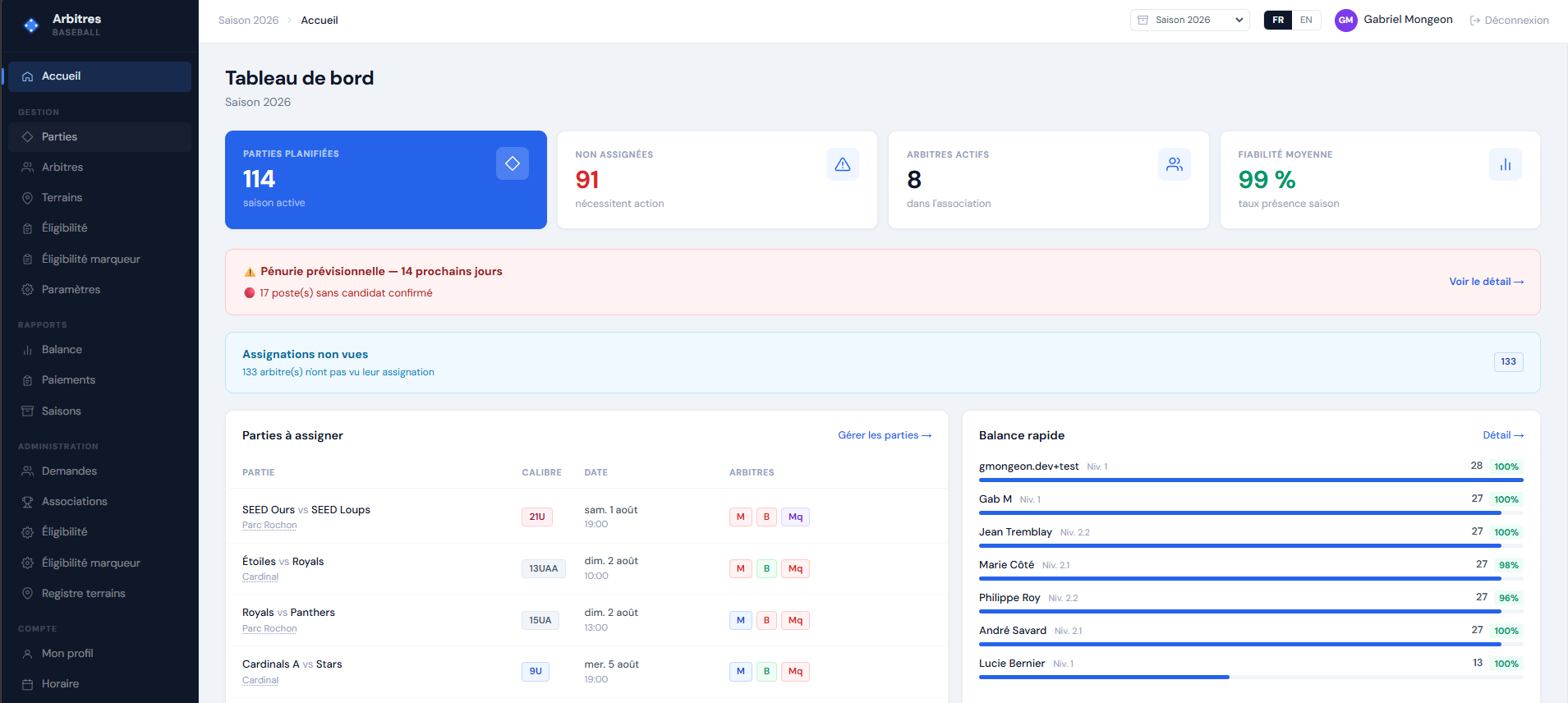 The coordinator home: the season’s games, the ones left to assign, and everyone’s balance.
When an assignment is created, the umpire gets an email with buttons to accept or decline directly, without logging in. On the other side, the coordinator sees who has not opened their assignment yet and can send a reminder. If the umpire withdraws, the application can send a replacement offer to the other available umpires and assign the first one who accepts.
There is everything else too: importing the schedule from a CSV, pairing two games into a doubleheader, cancelling or postponing games in bulk, and tracking payments with a rate grid by category and position.
The application also pulls the weather forecast for each field and flags the games at risk when the chance of rain goes over 70 percent within 36 hours. The coordinator can then cancel the batch in one go. The forecasts come from Open-Meteo, with no API key.
Blazor WebAssembly, Supabase and Azure Static Web Apps
I am alone on the project and I wanted to keep costs close to zero. That pretty much decided all my choices.
The frontend is Blazor WebAssembly on .NET 10. I have been doing C# for a long time, and Blazor WASM compiles to static files. No need for a .NET server.
The backend is Supabase: PostgreSQL, authentication, Realtime and Edge Functions. I have no custom API to write or to host. The C# client talks directly to Postgrest, and the Edge Functions cover what has to run server side, like the emails sent through Azure Communication Services.
Hosting is on Azure Static Web Apps, free tier, with continuous deployment through GitHub Actions. Every pull request gets its own preview environment, which I use to validate before merging. I covered that part in detail in the series on Azure Static Web Apps with Blazor, which already used this project as its example.
For login, I use the magic link by email, with Google OAuth as an option. There is no self signup for umpires: the coordinator invites them, and associations register through a public form that I approve manually.
RLS as the only source of truth
Every association shares the same database. Isolation goes through Postgres Row Level Security policies, with an association_id column on the tables and two SQL functions that give the connected user’s context:
-- the connected user's association
select mon_association_id();

-- their role: arbitre, responsable or super_admin
select mon_role();
That changes how you write code with Blazor WebAssembly. The application runs in the browser, so a filter in a Blazor component is only for display. Anyone can call the API directly with the same key. RLS is the only real barrier.
The domain rules are in the database too. An arbitre_a_conflit(arbitre_id, partie_id) function detects overlaps and back to back games on different fields, and that conflict blocks the assignment. Eligibility does not block: an ineligible umpire shows a warning, but the coordinator can still assign them. The provincial grid serves as the default value and each association can override it.
From the shortage alert to automatic filling
A lot of Quebec associations get their schedule through Spordle Play, the platform used by Baseball Québec. It handles schedule management well. What I wanted to add is the assignment part when people are missing.
Three features come from that. The first one is a shortage alert. It is a SQL view that looks at the next 14 days and lists every position at risk. A position with no eligible and available candidate shows up in red. A position covered only by availability generated from a recurring template shows up in orange, because that is less reliable than availability entered by hand.
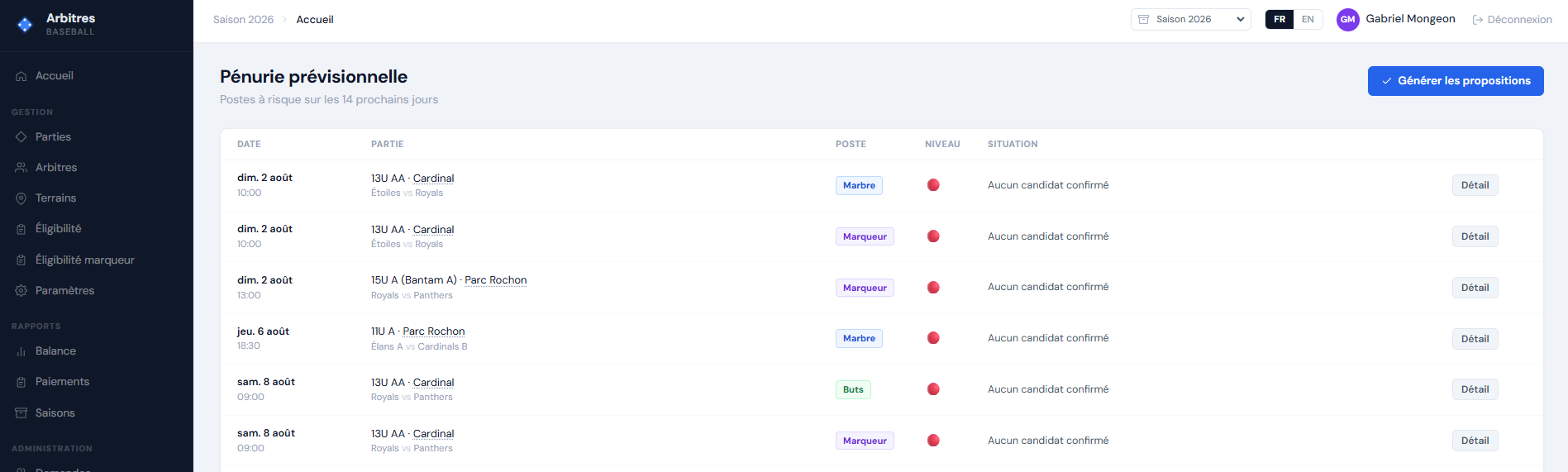 Every position at risk over the next 14 days. Here they are all red because no candidate is confirmed.
The second one is a suggestion score on the assignment page. Candidates are sorted by eligibility, then by a score that accounts for the season workload, the reliability rate, category and partner preferences, and field proximity. Each candidate shows a row of chips explaining their ranking.
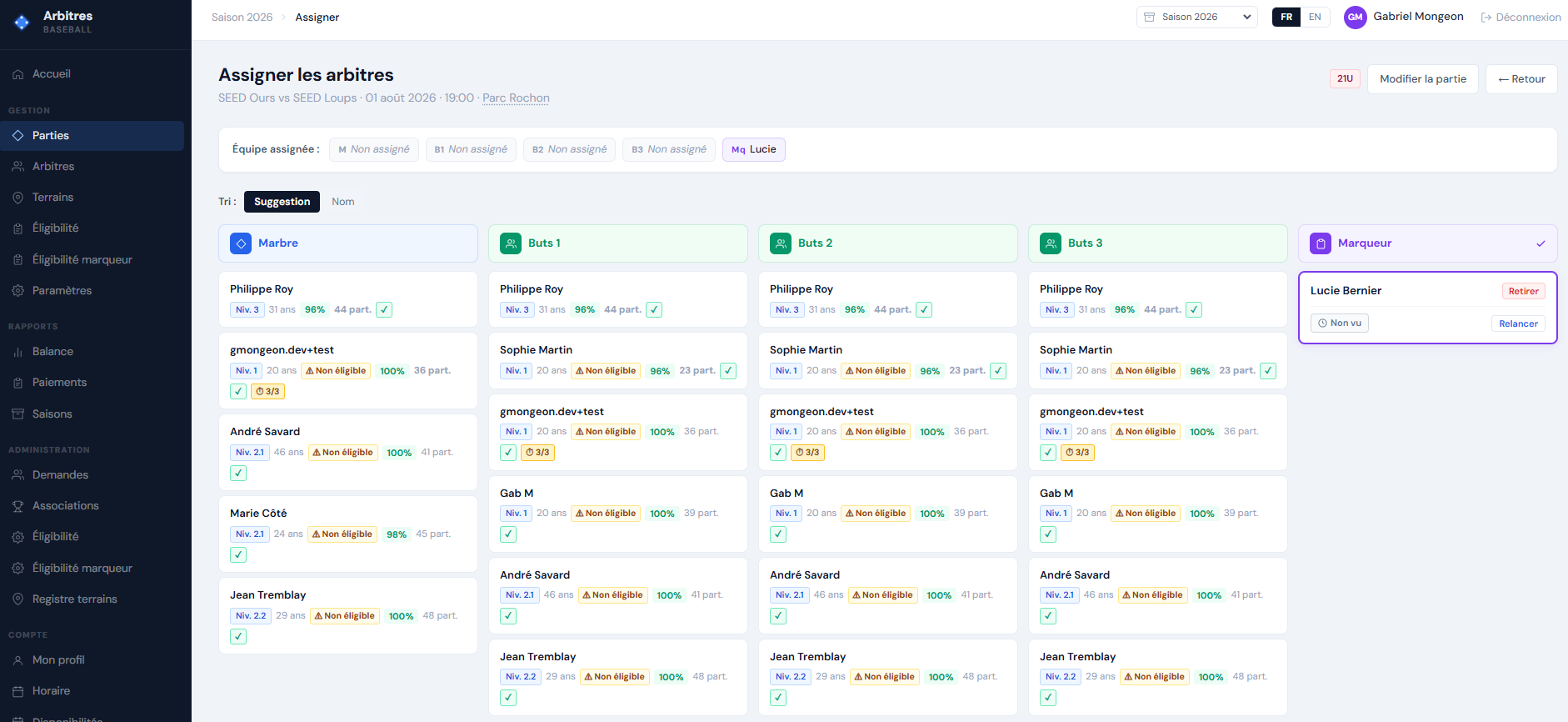 The candidate ranking, with the score explanation on the same row.
The third one brings the other two together. From the shortage page, the “Generate proposals” button runs a solver that fills the empty positions. It sorts the positions from most constrained to least constrained, then places candidates one at a time, with the balance and the weekly maximum shifting at every placement. The ranking comes from the same score as the assignment page, not from a parallel piece of logic.
The coordinator reviews the list, removes what they do not want, and accepts the rest in one go. Each proposal is either a direct assignment or a targeted offer sent by email when the availability is not confirmed. The solver never touches an existing assignment, it only fills the holes. Nothing is stored either: the result lives for the duration of the review.
I set myself a constraint for these three features: no configuration screen. The thresholds, the 14 day horizon and the score weights are hard coded. A volunteer coordinator does not want to calibrate an algorithm before using it. I preferred to explain the ranking on screen.
The application is deployed and working. You can take a look at arbitres.ca.
Happy coding, and in the next article I go through the method I used to build all of this with Claude and Copilot.
This post was written with AI assistance and edited by me.